

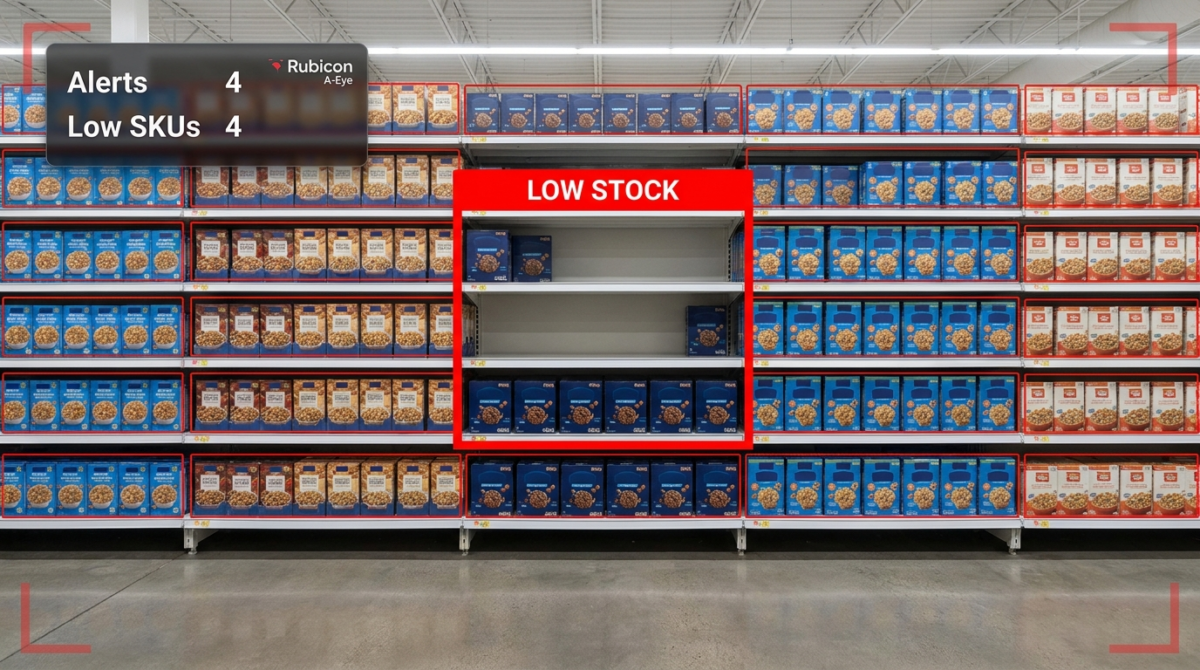
Retail AI
Detecting a low shelf is only useful if the right person hears about it in time to act. Rubicon A-Eye turns shelf and stock conditions into threshold-based alerts that reach the right channel, escalate when ignored, and close the loop with a logged action — the notification and escalation layer that sits on top of detection and counting.
The business challenge
Most retailers already have some way of seeing that stock is low — a shelf walk, a report, a count. The harder problem, and the one that rarely gets solved well, is what happens after that. Who gets told? Through which channel? How urgently? And what happens if nobody acts? Detection without a reliable notification and escalation path just produces information that sits unused until someone happens to look at it.
In practice, low-stock notification in most stores is informal and inconsistent. One supervisor checks a report at the start of the shift; another does not. A WhatsApp message gets sent to a group chat and scrolls past unseen. A printed list is left on a desk. None of this is a process — it is a collection of habits that work until they do not, and the gaps in coverage are exactly when stockouts happen.
For operations managers, the result is a familiar and frustrating pattern:
- Low-stock information that exists somewhere but does not reliably reach the person who can act
- No defined threshold for what counts as “low” — it varies by shelf, shift and judgement
- Alerts sent once, with no follow-up if nobody actions them
- No record of how long stock sat low before someone responded
- Different urgency treated the same way, so a slow mover and a fast mover get identical notifications
- Accountability gaps when a stockout happens and nobody can say who should have acted
The hidden cost of an unmanaged alert
An alert that is sent but not acted on is functionally the same as no alert at all — except it creates a false sense that the problem is being handled. Retailers that treat detection as the finish line discover that the real failure point is almost always downstream: the notification reached the wrong person, reached the right person at the wrong time, or reached someone who had no clear accountability for acting on it. Fixing detection without fixing the notification and escalation path solves only half the problem, and often the easier half.
How Rubicon A-Eye solves the problem
A-Eye’s low stock alerting is a rules and escalation layer that sits on top of shelf detection and stock counting. It does not just observe that a facing or zone has crossed a threshold — it decides what to do about that fact: who to notify, through which channel, how urgently, and what happens if the first notification goes unanswered.
Thresholds are configured per shelf, zone or product line to match how that line actually behaves. A slow-moving line might alert at a relaxed threshold with a routine notification; a high-velocity promoted line might alert earlier and escalate faster, because the cost of missing it is higher. This is deliberately distinct from raw stock counting: counting tells you the number, alerting decides whether that number, in that context, requires someone’s attention right now.
Notifications route to the channel that fits your operation — staff handheld devices, in-store dashboards, supervisor messaging, or task queues inside Odoo. If an alert is not acknowledged or actioned within a defined window, it escalates automatically to a supervisor or an alternate channel, so a missed notification does not silently disappear. Every alert, acknowledgement and resolution is logged, which gives managers a record of response time and accountability that a one-off message in a group chat never could.
Key capabilities
Configurable thresholds
Set low-stock levels per shelf, zone or product line, matched to how fast that line actually moves.
Multi-channel notification
Send alerts to staff devices, in-store dashboards, supervisor messaging or Odoo task queues, individually or in combination.
Automatic escalation
Unacknowledged alerts escalate to a supervisor or alternate channel after a defined window, so nothing silently lapses.
Priority tiers
Treat high-velocity or promoted lines with faster, more urgent alerting than slow movers, rather than one-size-fits-all notifications.
Acknowledgement & resolution logging
Every alert is tracked from raised to acknowledged to resolved, creating an accountability record for response time.
Odoo task generation
Alerts can create replenishment or purchasing tasks directly in Odoo, closing the loop from notification to action.
What you can measure
- Average time from alert raised to acknowledged, by staff member and shift
- Average time from acknowledged to resolved, by shelf and category
- Escalation rate — how often alerts go unanswered long enough to escalate
- Alert volume by threshold tier, store and time period
- Stockouts that occurred despite an alert being raised, and why
- Channel effectiveness — which notification routes get the fastest response
Industry applications
Threshold-based alerting and escalation is valuable wherever low-stock detection exists but the notification path is currently informal:
Multi-store chains and franchise networks benefit most directly, because alerting and escalation rules can be standardised across every location instead of varying by individual store culture. High-velocity grocery and convenience retail benefit from priority-tiered alerting on fast movers where minutes of delay matter. Larger format stores with bigger teams benefit from clear routing so an alert reaches whichever staff member is actually positioned to act, not a general broadcast.
Business benefits
- Low-stock conditions reliably reach a specific accountable person, not a general channel that may go unread
- Faster average response time through defined escalation rather than informal follow-up
- Clear accountability and a logged record when a stockout occurs despite an alert
- Consistent alerting standards across every store in a multi-site network
- Differentiated urgency so high-velocity lines get faster treatment than slow movers
- Reduced reliance on staff remembering to check a report or message thread
How it works: the operational workflow
Example scenarios
Escalating a missed notification
A low-stock alert for a fast-moving beverage line is sent to the floor staff handheld at 2pm. By 2:20pm it has not been acknowledged. The system automatically escalates the alert to the shift supervisor’s device, who reassigns it. The shelf is restocked by 2:35pm instead of sitting empty for the rest of the afternoon.
Result: a missed first notification did not become a missed sale, because escalation caught it.
Differentiating urgency by line velocity
A slow-moving specialty item and a high-velocity promoted item both cross their low-stock thresholds within the same hour. The promoted item triggers an immediate, escalating alert; the specialty item generates a routine notification for the next scheduled restock round. Staff attention goes where it matters most first.
Result: limited staff time spent on the highest-impact gap, not split evenly across both.
Standardising alerting across a franchise network
A franchise group previously left low-stock notification entirely to individual store managers, with wildly inconsistent results. Rolling out a standard threshold and escalation configuration across every location gives head office a consistent, comparable response-time metric for the first time.
Result: network-wide visibility into which stores respond fast and which need support.
Building accountability after a stockout
A high-profile line sells out despite the system having raised an alert two hours earlier. Because every alert, acknowledgement and resolution step is logged, the operations manager can see exactly where the response broke down — the alert was acknowledged but the restock task was never completed — and addresses the specific gap in the process.
Result: the cause of a stockout is identified precisely instead of generating blame without evidence.
Integration with your systems
Alerting earns its value by reaching the channels your team actually works in and feeding the systems that drive action. As a certified Odoo partner, Rubicon builds this connection into the solution directly.
| System | How A-Eye connects |
|---|---|
| Odoo ERP / Inventory | Alerts can generate replenishment or purchasing tasks directly, linking notification to action in one workflow. |
| Staff messaging & devices | Notifications route to handheld devices, supervisor messaging apps or in-store displays based on configured rules. |
| Dashboards | Live alert status, response times and escalation history for store and regional managers. |
| Reporting systems | Response-time and escalation metrics exported for operational and accountability reporting. |
Implementation and rollout
Alerting rules are configured deliberately rather than switched on all at once. A typical rollout starts with a short workshop to define thresholds, priority tiers and escalation windows for your key categories, followed by configuration of the notification channels your team actually uses — handheld devices, supervisor messaging, dashboards or Odoo task queues. During a validation period, alerts run alongside your existing process so the team can confirm response times and escalation behaviour match expectations before the new workflow fully replaces informal notification habits.
Most retailers begin with thresholds for their highest-velocity or highest-risk categories, where the cost of a missed alert is greatest, and expand coverage to the rest of the range once the escalation workflow is proven. Because the underlying detection already exists through shelf monitoring or stock counting, adding the alerting and escalation layer is typically a configuration exercise rather than a lengthy technical build, and can be live within a short timeframe.
Why structured escalation outperforms informal notification
The default alternative to a structured alerting system is the informal mix most stores already run on — a report, a message, a habit. The problem is not that these channels never work; it is that they work inconsistently, and the inconsistency is invisible until a stockout exposes it. There is no record of whether the message was seen, no defined consequence if it was not, and no way to know in advance which shelves are covered by someone’s diligence and which are not.
A rules-based alerting and escalation layer replaces inconsistency with a defined process: a threshold is crossed, a specific channel is notified, a window is set for acknowledgement, and an escalation path exists if that window passes. This does not require perfect staff behaviour to work, because the system itself carries the responsibility for making sure a low-stock condition is not silently dropped. For multi-store operators, it also means every location runs the same accountability standard, rather than relying on the strongest individual store managers to compensate for weaker processes elsewhere.
Frequently asked questions
How is this different from shelf monitoring or stock counting?
How are thresholds set?
What happens if an alert is ignored?
Which channels can alerts be sent to?
Can different products have different alert urgency?
Is there a record of how alerts were handled?
Does this require product recognition to work?
Can alerting work across multiple stores with consistent rules?
Does this replace the need for staff to check reports manually?
How does this connect to Odoo?
Can we adjust thresholds after go-live?
What does it cost?
Make sure a low-stock alert never goes unanswered
Book a demo or a no-obligation review and we will show A-Eye’s alerting and escalation rules configured for an operation like yours.