

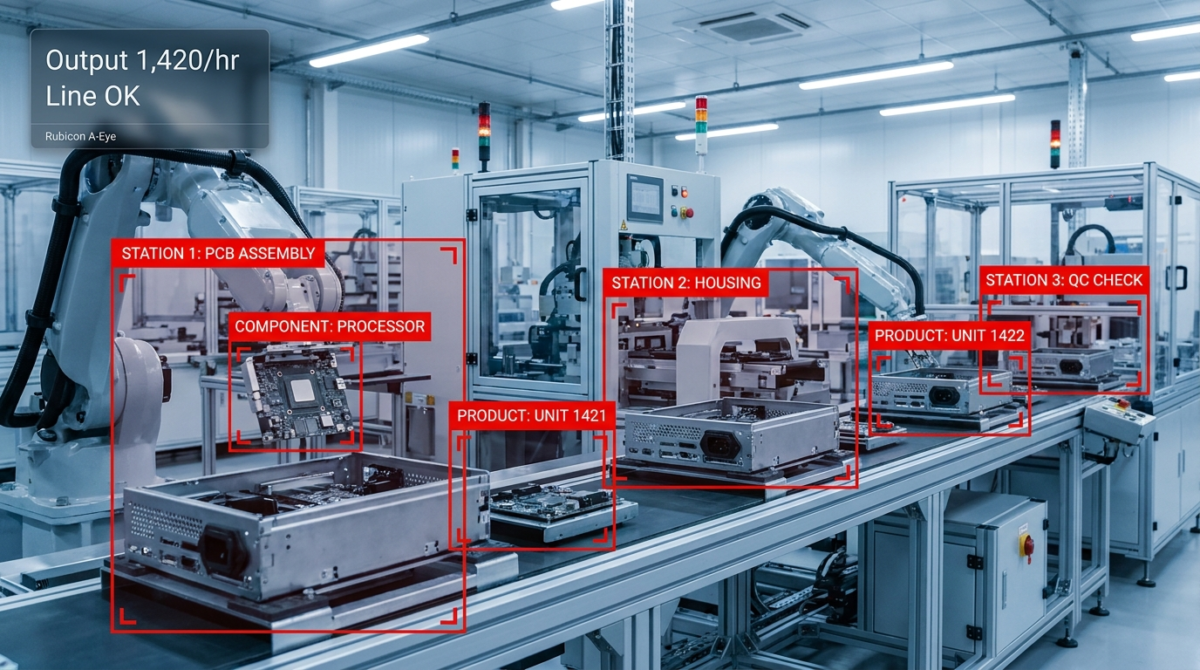
Real-time visibility into line throughput, machine downtime, and output—powered by computer vision that counts cycles, flags stoppages, and validates production targets without relying on manual timesheets or outdated SCADA logs.
The Production Challenge
Your Current Reality
- Line stops for 15–30 minutes without immediate alert; output loss quantified hours later from log review.
- Cycle counting relies on operator observation or mechanical counters prone to error and manual transcription.
- No real-time correlation between material feed, machine state, and output—root-cause diagnosis lags.
- Quality gates (pass/fail on count) happen at end-of-shift packing, not in-process; rework costs spiral.
- Hidden cost: ~8–12% of potential throughput lost to undetected micro-stoppages and operator drift.
How Production Monitoring Solves It
A-Eye’s Production Monitoring uses frame-by-frame computer vision to extract three signals from your line:
- Cycle Detection: Machine-agnostic—recognizes part ejection, arm extension, or index motion regardless of line geometry. No counters. No PLC integration required.
- Downtime Identification: Flags stoppages >30 sec (configurable) and surfaces root likely cause: jam, feed starve, pneumatic fault, or operator break.
- Output Validation: Compares real-time cycle count vs. batch target; triggers alert if shortfall emerges mid-run.
Key Capabilities
Sub-Second Cycle Recognition
Identifies part ejections or arm cycles in <30 ms, enabling true real-time count accuracy on lines up to 1000+ cycles/min.
Predictive Stoppage Alert
Detects anomalies in cycle variance that predict jams or feed starvation 10–30 sec before full line stop.
Multi-Angle Robustness
Learns from 2–4 camera angles simultaneously; self-calibrates if camera is bumped or lighting shifts.
Output Targets
Compare cycle count to batch size; auto-flag when shortfall reaches 5% or 10% thresholds (user-configurable).
Downtime Reason Inference
Correlates stoppages with frame features: absence of motion, material visible at feed, or operator hand near the line.
Shift-Aligned Reporting
Hourly and shift summaries: total cycles, uptime %, downtime reason breakdown, output vs. target.
What You Can Measure
Industry Applications
Business Benefits
Operational Workflow
Example Scenarios
Scenario 1: Micro-Stoppage Detection
Situation: Injection molding line set to run 500 cycles/shift. At cycle 347, the machine hesitates for 45 sec (feed starve), then resumes.
Without Monitoring: Operator notes downtime only at shift end; parts are counted but marked “questionable quality.” Investigation happens next shift.
With A-Eye: Alert sent 10 sec into stoppage. Supervisor checks feed hopper, finds pellet bridge. Clears it in 3 min; line resumes. Shift target still achieved. Result: 45-sec incident → 5-min resolution, zero rework.
Scenario 2: Output Target Validation
Situation: Assembly line must complete 1200 units in 8-hour shift. By hour 4, only 520 cycles recorded (vs. 600 target).
Without Monitoring: Discovered at shift change; overtime authorized but not yet committed; coordination takes 1 hour.
With A-Eye: Dashboard shows 13% shortfall at 50% shift elapsed. Supervisor alerts line lead immediately; discovers operator running line at 80% speed. Corrects settings. Line recovers to pace. Result: 20-min correction window vs. 1-hour lag; target achieved on time.
Scenario 3: Downtime Root-Cause Clarity
Situation: Stamping press stops for 8 min mid-shift. Multiple possible causes: jam, material feed issue, hydraulic pressure drop.
Without Monitoring: Technician reads PLC logs (30 min wait); logs show only “stop” event, not cause. Guesses hydraulic issue; calls vendor.
With A-Eye: Incident snapshot shows material jammed at entry. Downtime reason inferred: “jam.” Operator clears part in 2 min. Video evidence available for process improvement. Result: 8-min loss → 2-min actual downtime; no false technician dispatch.
Scenario 4: Shift-to-Shift Trending
Situation: Filling line shows downtime spiking on Day Shift (avg 12 min/shift) vs. Night Shift (avg 4 min/shift). Root unclear.
Without Monitoring: No visibility; management suspects operator skill variance but no proof.
With A-Eye: 7-day trend report reveals Day Shift has 3x more “feed starve” incidents. Investigation: material temperature from ambient heating. Night shift room stays cool. Facility adds shade screen. Result: Data-driven fix; Day Shift downtime reduced to 5 min/shift.
Integration & Data Flow
| System | Integration Method | Data Shared |
|---|---|---|
| ERP / MES | REST API / CSV export (hourly or shift-end) | Cycle count, downtime min, output vs. target % |
| PLC / Machine Controller | Webhook (optional) on downtime events | Stoppage alert, inferred cause for logging |
| Slack / Teams | Native alert channel (configurable) | Downtime >threshold, shortfall alerts |
| Analytics DB | Direct write (A-Eye logs raw events) | Frame-level cycle events, timestamps, metadata |
| Mobile App | WebSocket (live updates) | Live cycle count, downtime status, daily KPIs |
Frequently Asked Questions
What line speeds can A-Eye handle?
A-Eye processes at 30 FPS (or configurable up to 60 FPS). This reliably detects cycles on lines running up to 1500 cycles/min. For faster lines, dual-camera setups with offset timing cover the entire motion. Contact our team for application-specific benchmarking.
Does Production Monitoring require a PLC connection?
No. A-Eye is fully vision-based and requires only camera placement and network connectivity. If you want to log results back to your PLC or MES, we provide REST API webhooks; otherwise, A-Eye maintains its own timeline and reporting.
How accurate is downtime cause inference?
Inference is typically 75–85% accurate for common causes (jam, feed starve, operator manual intervention). All inferred causes are presented with a snapshot for operator confirmation. As your operation uses A-Eye, accuracy improves via reinforcement learning.
Can the system adapt to lighting or camera bumps?
Yes. A-Eye includes auto-calibration: if lighting changes >20% or camera position shifts, the system detects anomalies in cycle patterns and re-learns the cycle region. Manual recalibration takes ~2 min if needed.
What alert channels are supported?
SMS, email, Slack, Microsoft Teams, and in-app notifications. You configure escalation rules: e.g., SMS after 5 min downtime, email to supervisor, Slack to ops channel. Mobile app provides live dashboard on any device.
How is video data stored and who has access?
A-Eye stores only incident snapshots (not full video) on your premise or secure cloud. Role-based access control (admin, supervisor, operator) limits data visibility. All storage and transmission is encrypted. Retention is configurable (7, 30, 90 days).
What is the typical deployment time?
For a single line: 2–4 hours (camera setup + network config + 30 sec calibration video). For multi-line deployments, we work with your IT team to stage cameras in parallel. Full production monitoring usually live within 1 working day.
Can I use existing factory cameras?
If your cameras output RTMP, RTSP, or HTTP streams at 720p or better, A-Eye can ingest them. We also recommend dedicated USB or PoE cameras for production lines to ensure consistent frame rate and no contention with security systems.
How does this differ from mechanical counters?
Mechanical counters miss partial cycles and require manual reads. A-Eye timestamps every cycle, detects anomalies (e.g., double-cycles or missed cycles), and correlates cycles with line state. You get a digital record, not a dashboard needle.
Do I need on-premise servers or edge hardware?
A-Eye offers two modes: (1) Cloud processing—video streams to A-Eye cloud, results returned in <100 ms; (2) Edge (on-site GPU)—full processing on-premise for air-gapped or high-latency environments. Hybrid mode is also supported.
What happens if the network connection drops?
If using cloud processing, the edge gateway buffers video frames and syncs results as soon as connection resumes (no loss). If using local GPU, monitoring continues offline; you lose real-time alerts until reconnected. All incident data is preserved.
How much will Production Monitoring cost for my facility?
Pricing is based on number of lines and feature tier (Lite, Pro, Enterprise). A typical 5-line facility starts at A-Eye Pro ($12,500/year). Includes setup, 30 days of data retention, and 2 support incidents per month. Request a quote for your specific setup.